


Flash Tip: Move categories again in Prestashop’s back office
In this flash tip we will see how to take the movement arrows back for the category list in the back office of Prestashop 1.5.6 and up
Watch The screencast
Text version
If you just uploaded to a Prestashop version higher 1.5.6, you will have noticed you can’t move categories anymore from the back office. Actually, this is only half true, you can move categories… if you do what Prestashop wants.
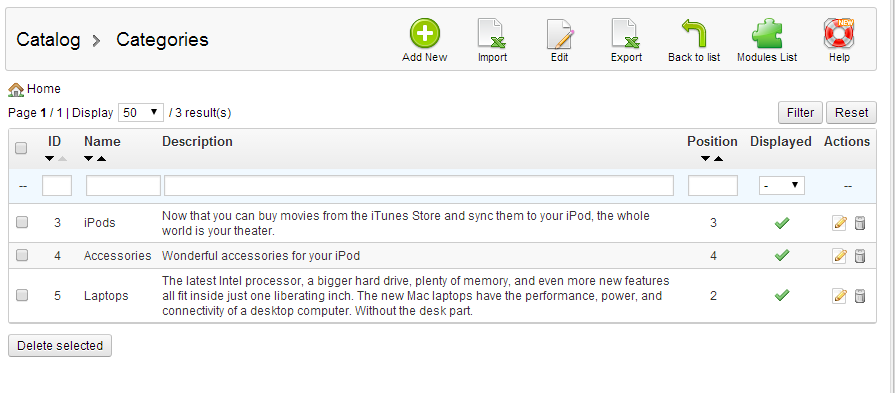
By default, to make the shy arrows pop out, you have to sort by position ascendant, by clicking the button highlighted in the next picture. Boring, huh? If you hit rese,t they will vanish again.

To take them back by default, we therefore need to tell Prestashop to sort by position (ascendant) if no sorting parameter is passed. Open up AdminCategoriesController, that you can find in controllers/admin. You can use an override if you prefer, I will go ahead and edit the core file. Locate”
	public function getList($id_lang, $order_by = null, $order_way = null, $start = 0, $limit = null, $id_lang_shop = false)
	{
		parent::getList($id_lang, $order_by, $order_way, $start, $limit, Context::getContext()->shop->id);
		// Check each row to see if there are combinations and get the correct action in consequence

		$nb_items = count($this->_list);
		for ($i = 0; $i < $nb_items; $i++)
		{
			$item = &$this->_list[$i];
			$category_tree = Category::getChildren((int)$item['id_category'], $this->context->language->id);
			if (!count($category_tree))
				$this->addRowActionSkipList('view', array($item['id_category']));
		}
	}
At the very beginning, add:
	public function getList($id_lang, $order_by = null, $order_way = null, $start = 0, $limit = null, $id_lang_shop = false)
	{
		if(!Tools::getValue('categoryOrderby'))
			$order_by = 'position';
		if(!Tools::getValue('categoryOrderway'))
			$order_way = 'asc';
	}
Explanation: we are simply telling Prestashop to use order by position adcendant if no category order parameter is passed (aka: we didn’t click anything or tried to input any filter).
The final method:
	public function getList($id_lang, $order_by = null, $order_way = null, $start = 0, $limit = null, $id_lang_shop = false)
	{

		if(!Tools::getValue('categoryOrderby'))
			$order_by = 'position';
		if(!Tools::getValue('categoryOrderway'))
			$order_way = 'asc';

		parent::getList($id_lang, $order_by, $order_way, $start, $limit, Context::getContext()->shop->id);
		// Check each row to see if there are combinations and get the correct action in consequence

		$nb_items = count($this->_list);
		for ($i = 0; $i < $nb_items; $i++)
		{
			$item = &$this->_list[$i];
			$category_tree = Category::getChildren((int)$item['id_category'], $this->context->language->id);
			if (!count($category_tree))
				$this->addRowActionSkipList('view', array($item['id_category']));
		}
	}
Refresh the back office, reset all filters, and you will have the arrows back


